
FX Data

Cloud and infrastructure automation

From the server room to the cloud, we put your infrastructure work on automation.

FX Data pairs more than ten years of IT infrastructure experience with AI. We automate repetitive work on AWS, Azure, Google Cloud, Oracle Cloud, Huawei Cloud and VMware vCenter with Terraform, Ansible, Python and AI agents that ask before they act.

10+
years in IT infrastructure
5
clouds: AWS, Azure, GCP, Oracle, Huawei
6
service areas, from build to run
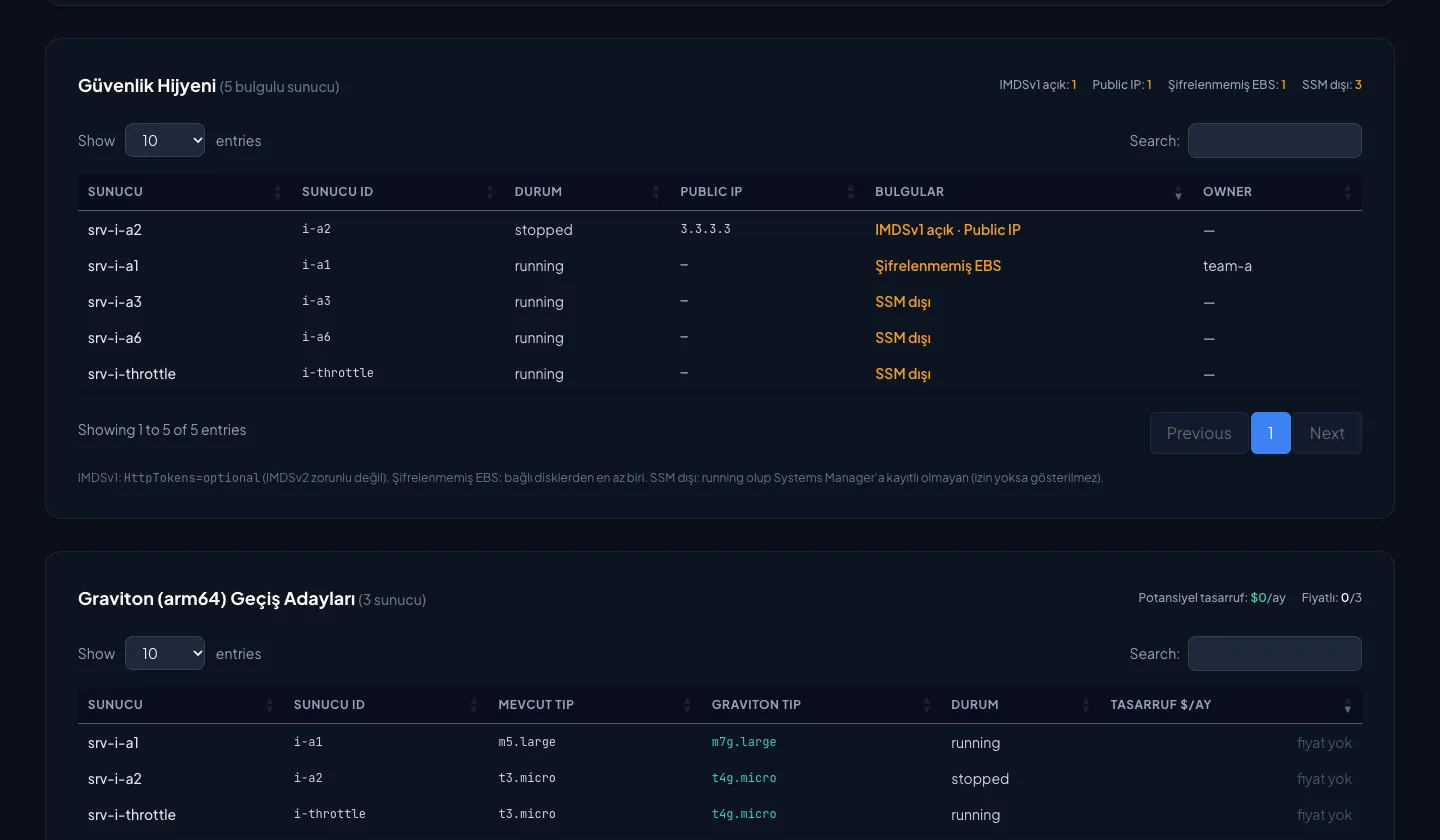
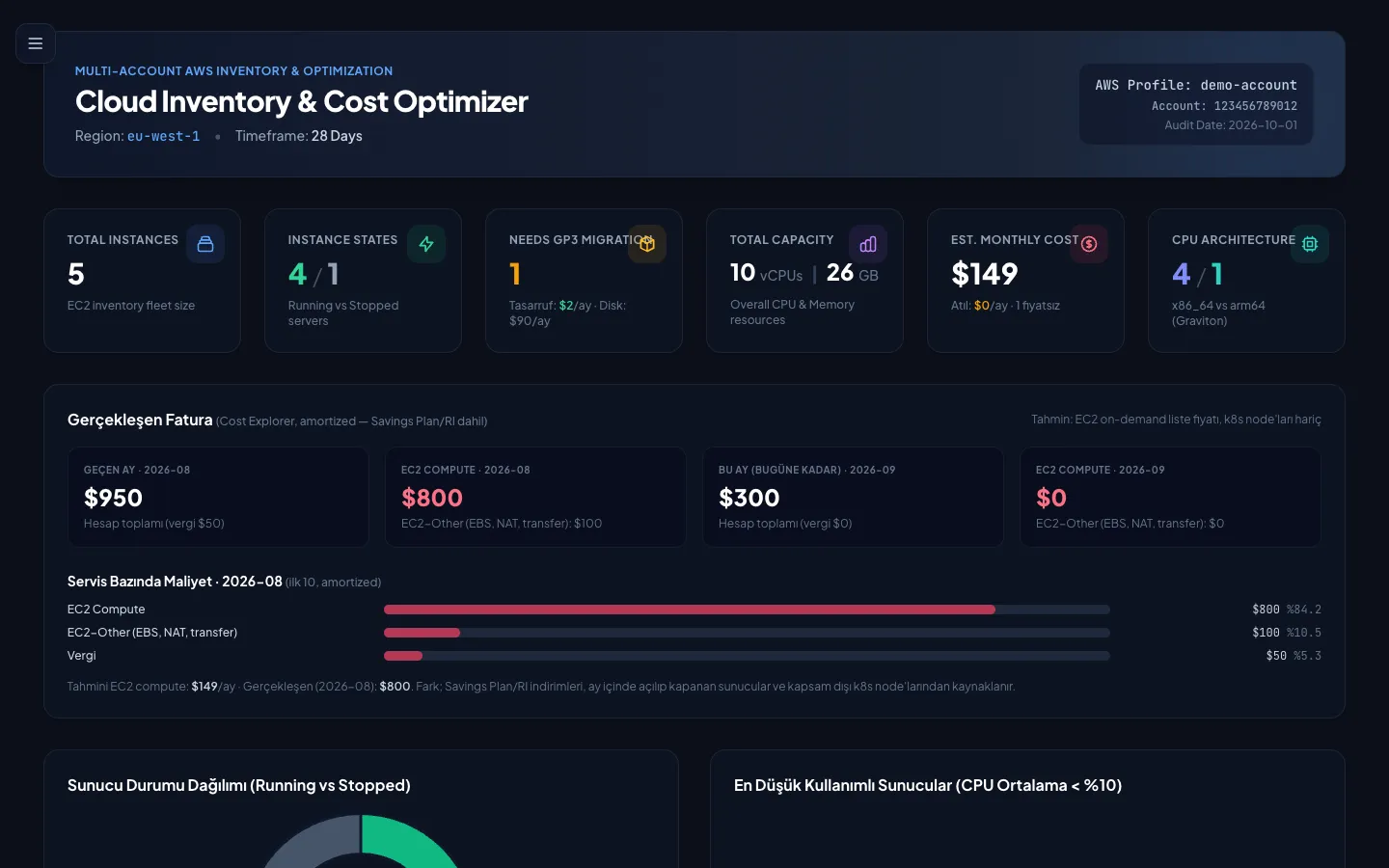
Cloud Inventory & Cost Optimizer: Cloud Inventory & Cost Optimizer sample report and AI Task Solver sample session; no real account data.
Cloud Inventory & Cost Optimizer sample report and AI Task Solver sample session; no real account data.

Platforms and technologies we work with

  • AWS
  • Google Cloud
  • Microsoft Azure
  • VMware vCenter
  • Terraform
  • Ansible
  • Python
  • Huawei Cloud
  • Oracle Cloud
  • Kubernetes
  • Linux
  • Windows Server
  • GitHub
  • Bitbucket
  • Jira
  • Claude Code
  • ChatGPT
  • TypeSafe AI · Jev

What we do

The same discipline in the cloud and in the server room

From cloud infrastructure to virtualisation, from cost to security, we work the same way at every layer: we start read-only, apply with your approval and report results with their source.

01

Cloud infrastructure and migration

We build your cloud environment and plan and carry out your move to the cloud.

  • Account, subscription and core network setup
  • Identity, access and tagging standards
  • Migration planning and execution
  • Hybrid cloud and data-centre connectivity
Details

02

Infrastructure as code and automation

We turn your infrastructure into Terraform and Ansible code and put every change through an approved flow.

  • Modular Terraform infrastructure
  • Bringing existing resources under code
  • CI/CD with plan, approval and apply
  • Configuration management with Ansible
Details

03

Cloud cost optimisation

We put the inventory and cost of every account in one report and show waste with its source.

  • Multi-account inventory and cost report
  • Clean-up of idle servers, orphaned disks and old snapshots
  • Rightsizing and scheduled shutdown
  • Savings Plan and RI coverage analysis
  • Monthly cost and savings report
Details

04

Virtualisation and data centre

We automate provisioning, capacity, hygiene and patching in your VMware vCenter estate.

  • VM provisioning from templates
  • Snapshot, powered-off VM and datastore hygiene
  • Cluster, host and datastore capacity report
  • OS patching and configuration management
  • Cloud migration readiness
Details

05

Security and compliance checks

We scan your cloud and on-prem resources regularly, report findings by priority and close them out.

  • Security group and access review
  • Encryption, public-resource and IMDSv2 checks
  • Tagging compliance
  • Backup and continuity checks
Details

06

Managed operations and AI agents

We run your repetitive infrastructure requests from ticket to closure with AI agents that ask before they act.

  • Request-to-closure operations agent
  • Pre-shutdown server audit
  • Automated worklogs and savings records
  • An AI way of working and training for your team
Details
See services

Team tools

Built from a cloud team's daily work

Cloud Inventory & Cost Optimizer and AI Task Solver were written to cut a cloud infrastructure team's repetitive work and are in use in-house today. The automation we build for you sits on top of them.

01 / 02 · Team tools

Cloud Inventory & Cost Optimizer

Cloud inventory and FinOps in one tool

Builds one up-to-date inventory of servers, databases, clusters and disks across many AWS accounts. By cross-referencing inventory, usage metrics, pricing and the actual bill, it reveals the real cost impact of every resource.

  • Multi-account scan
  • Usage, price and bill together
  • Savings opportunities
v0.13 · in use in-houseView product
Cloud Inventory & Cost Optimizer: Sample report generated from test fixtures; contains no real account data

02 / 02 · Team tools

AI Task Solver

From ticket to closure, operations with AI

A workspace where an infrastructure team resolves Jira tasks by talking to an AI agent. The agent reads the task, inspects AWS read-only, works out the cost impact and reports back with evidence. Recurring work becomes a skill.

  • Solve by conversation
  • Read-only audit
  • Approval gates
In-house · experimentalView product

From the field

We found it, then closed it out in Jira

Findings from a multi-account AWS estate after Cloud Inventory & Cost Optimizer went in. Each one became a Jira task and was resolved.

A multi-account AWS estate

Forgotten disks and old snapshots

Findings

  • Unattached EBS volumes and how many days they had sat idle
  • Snapshots aged by the day, flagged past 90 days
  • The monthly storage cost of each

OutcomeJira tasks went to owners for confirmation; approved items were removed after a backup check.

Cloud InventoryJira

A multi-account AWS estate

Servers stopped for months, still on the bill

Findings

  • How many days each had been stopped
  • The monthly amount still paid for their disks after compute stopped
  • The ones with no clear owner or tags

OutcomeApproved servers were terminated and their disks cleaned up; the saving went into the closing comment with its formula.

Cloud InventoryAI Task SolverJira

A multi-account AWS estate

Over-provisioned RDS storage

Findings

  • The gap between allocated and used storage
  • A suggested size that keeps a safe margin
  • One size down for under-used instances

OutcomeRecommendations were shared with the teams, then planned and resolved through Jira.

Cloud InventoryRDSJira

A multi-account AWS estate

Tag compliance and security hygiene

Findings

  • Resources missing Owner, Environment or CostCenter tags
  • Servers with IMDSv1 enabled, a public IP or unencrypted disks
  • Previous-generation instance types and their current equivalents

OutcomeFindings were ranked by priority and fixes were tracked as Jira tasks.

Cloud InventoryJira

Method

We build fast, never unchecked

The agent’s rules and task status live in markdown files. Every step is ticked off; a step that hits a rule stops in red until approval arrives.

OPS-102.mdtask status

# OPS-102 · decommission test-api

-Task read, scope clear
-Read-only checks: CPU, disks, DNS, dependencies
-Saving worked out: $82.51/mo (list price)
-Jira comment drafted
-stop → terminateBlocked: no explicit approval to write in production
-Worklog, closure and savings entry

The agent ticks off every step. A step that hits a rule stops in red and goes nowhere until approval arrives.

How we work with Claude

FAQ

Common questions

Anything not covered here, let's talk it through in a discovery call.

We are not on AWS. Does that work?

Yes. We build automation on AWS, Microsoft Azure, Google Cloud, Oracle Cloud and Huawei Cloud. Terraform and our method are provider-agnostic, and multi-cloud setups are covered too.

Our on-prem systems are closed to the internet. Can you still work with them?

We shape the way we work around your network rules. If needed, the automation runs entirely inside your network and no data leaves it.

What access do you need to our systems?

We start with read-only access. Any step that writes is done only with your approval and within limits agreed in writing.

Which AI tools do you use?

We work with Claude Code, ChatGPT and Codex. Our working rules are tool-agnostic, so the same setup works with whichever AI tool your team prefers.

Does our data go to an AI service?

We agree at the start which data is processed by which tool. For sensitive data, fully local solutions such as Annemin Sağlık Tool are an option.

How is pricing set?

We work as discovery, project or monthly support. We agree the scope in the free assessment, then send a quote.

How long does a project take?

It depends on scope. In the first call we look at the process together and agree on a small, measurable first step.

A free 30-minute assessment

Let’s look at your cloud costs and inventory together: where money is wasted, what the inventory is missing, and where automation should start.